For Claude Code and Codex
Shared memory for your coding agents
Every Claude Code and Codex session becomes a branch on one live map. You set the rules once and answer their questions in one inbox.
Free during the beta · Then $19/month
Example: a branch called checkout-refactor on the Memo map. Two steps are done, the test run is in progress, and the branch is waiting for your OK to deploy to production, because its passport says production deploys need your approval.
Why Memo
More work at once, on your terms
Memo keeps each session's map, your words and your rules outside the chat. Agents take on more at once, come back from memory resets with your words, and stay inside the limits you set.
-
Usage01
Spending you control
Each agent gets a short card with its task and your agreements, not your whole chat, and a spend cap you set.
Built in: an agent can't be started with your whole chat.
In our own use: 98 agents stopped at their cap in a week, and the main session carried about 20% less context.
-
Speed02
More work in parallel
The branch splits the work into steps and hands them to agents, several at once, up to the limit you set. When it needs you, it asks in the inbox and keeps going.
Built in: the turn is held while ready work waits for a free agent.
In our own use: about 6 agents at once in a typical session, up to 20, and 4 times as many agent runs per message.
-
Accuracy03
Your words survive resets
Memo saves every message you send, word for word. After a memory reset the session gets back its goal, your rules word for word and the agreements for the current step.
In our own use: 199 of 203 memory resets (98%) came back this way.
-
Autonomy04
Free to act, within your lines
The passport says what a branch may do alone: deploy, spend, delete. Agents get it every turn and can't change it. The rest they prepare and ask you about.
Built in: only your panel can change a passport.
In our own use: 917 actions that broke a branch's rules were stopped in a week.
-
Follow-through05
Nothing slips through
What you ask for and what the branch promises goes on the map before the turn can end. A step that hasn't moved in three hours is flagged, to the branch and to you.
Built in: a turn is held until your new words and its promises are written down.
-
Checks06
Done means checked
Work is marked done only with proof: a test run, a commit, a checked screen. After a miss, the branch writes what went wrong and what to change, and you pick.
Built in: “done” without proof is refused.
Numbers come from our own work with the engine Memo runs on: one owner, 17–23 September 2026, compared with the same owner's sessions from the three weeks before. Models and tasks changed too, so read them as our experience, not a promise.
How it works
Three steps, then work as usual
-
01
Create an account
Free during the beta, no card. You get your own graph on our server, separate from every other account.
-
02
Connect your computer
Your account page gives you one command. It adds the Memo hook, skill and MCP server to Claude Code and Codex.
-
03
Start a session
Ask it to connect to Memo. It becomes a branch: it writes its steps to the map, follows your passport and asks you in the inbox.
What you get
Everything your agents did, in one place
The panel shows every branch as a live map. Open it in any browser, on your laptop or your phone.

A map for every session
Each session is a branch. Every step becomes a node: what it's doing, what it checked, what's next. After its context is compacted, the session gets a summary of its own map back.
A passport you set
Switches for what each branch may do on its own, like deploying or spending money, and what it must ask you first. Agents read it on every turn.
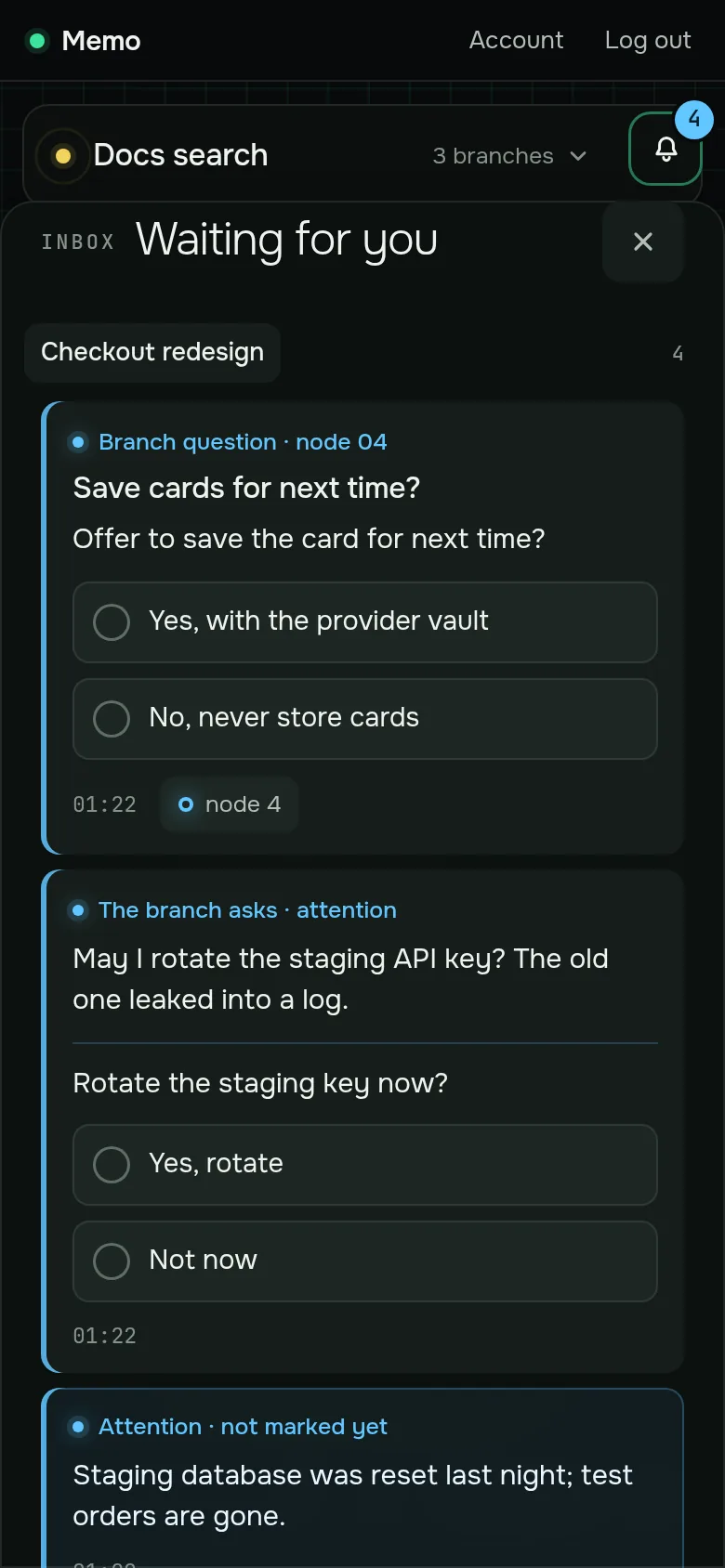
One inbox for questions
When a branch needs a decision, it asks with answer buttons. Questions from all branches land in one list, and your answer goes back to the branch.
Built into Claude Code and Codex
A hook connects each session, a skill teaches it the routine, and an MCP endpoint gives agents direct tools for the graph.
Passport
Rules your agents can't rewrite
You decide, branch by branch, what it may do alone. Flip a switch in the panel and the branch sees the change before its next action.
- Only you change it. Agents can read the passport. Changing it works only from your panel.
- "No" means "ask". When the passport says no, the branch prepares the work and asks you in the inbox.
- One per branch. A careful passport for production work, a relaxed one for experiments.

Inbox
Answer from anywhere
Branches ask with ready answers. You see open questions from every branch in one list and answer from your laptop or your phone.
- One list for all branches. No hunting through terminal windows.
- The branch picks up your answer and carries on.
Setup
One command per computer
Your account page gives you a one-time command. Run it in a terminal, and your sessions can use Memo.
Install
# from Account → Connect a computer
curl -fsSL https://memo.example/kit/install.py -o memo-install.py && python3 memo-install.py --server https://memo.example --code ABCD-EFGH
Native Windows isn't supported. Read the install guide to see exactly what the installer changes.
MCP tools for your agents
Claude Code gets Memo as an MCP server during install. For Codex, the installer prints the setting to add.
Your sessions keep running on your own Claude or Codex plan. Memo stores the graph; it doesn't run models.
FAQ
Questions
Do I still need a Claude or Codex subscription?
Yes. Memo doesn't run models. Your sessions keep using your own Claude Code or Codex plan; Memo stores their graph and serves the panel.
What does Memo store?
Your account (email, name, a hash of your password), the list of connected computers, and your graph: branches, nodes, passports, questions and answers, and the messages the Memo hook sends from your connected sessions.
The Privacy Policy has the details.
Can an agent change its own passport?
No. Agents can read the passport. Changing it works only from your panel.
Which systems does it work on?
macOS, Linux and Windows with WSL, with Claude Code, Codex, or both. Native Windows isn't supported.
Is Memo free?
Yes, during the beta, and you don't need a card. Paid plans start later.
How do I disconnect a computer?
Press Revoke next to it on your account page. Its key stops working right away. To remove the files as well, see Uninstall.
Give your agents a memory
Free during the beta. One command per computer.
Join the beta